
 By admin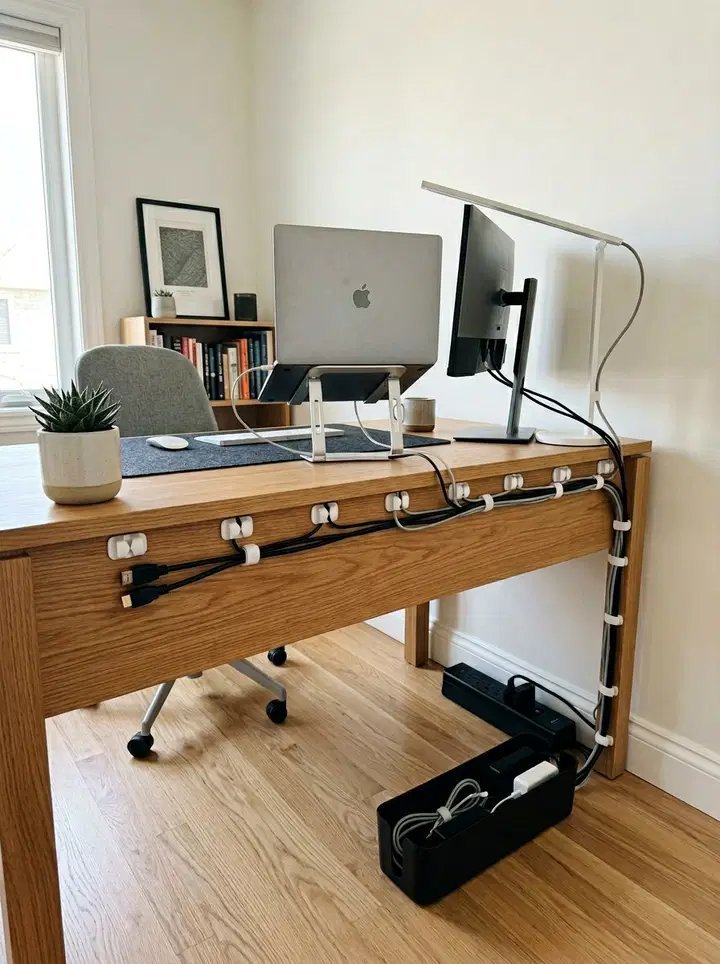
Behind every beautiful desk setup photo is a war zone of tangled cables — or a very organized person. Cable chaos isn’t just ugly: it’s a dust magnet, a troubleshooting nightmare (“which of these twelve black cables is the monitor?”), and mildly hazardous. The good news: a truly clean cable setup takes one focused hour and about $25 in supplies. Here’s the method.
What Is the Best Way to Organize Cables Behind a Desk? The Supplies
You need less than you think:
- Under-desk cable tray ($15–$25): A metal mesh basket that screws under the desk. This is the single most transformative purchase — power strips and bricks live in it, off the floor. Get one sized to your desk; IKEA’s Signum is the classic.
- Velcro cable ties ($8 for a roll): Buy the cut-to-length roll, not pre-sized loops. Velcro beats zip ties because you’ll redo this eventually — zip ties require cutting and re-doing.
- Cable sleeves or spiral wrap ($10): For bundling the thick trunk of cables running from desk to floor.
- Adhesive cable clips ($7): Route individual cables along desk edges and legs.
- Label maker or masking tape + marker: Label both ends of every cable. Future-you troubleshooting at midnight will be grateful.
- A 6–8 outlet power strip with a long cord: Mount it in the tray. One strip to rule them all beats three strips daisy-chained on the floor.
IKEA’s cable management range covers most of this affordably, and their stuff is designed to work together.
The Method: Unplug Everything and Start Over
Don’t try to organize cables while they’re plugged in — that’s like organizing a closet without taking anything out. The method:
- Photograph the current setup (so you know what plugged where).
- Unplug everything. Yes, everything. Pull the whole spaghetti mass out.
- Declutter ruthlessly. That USB cable for a camera you sold in 2019? Gone. Duplicate chargers? Keep the best one. Most desks have 30% cables that serve nothing.
- Mount the tray and power strip under the desk, toward the back.
- Plug in by category: power bricks and wall warts go in the tray (they’re the ugliest and bulkiest). Route monitor/laptop cables along the desk edge with clips. Bundle the floor-bound trunk in a sleeve.
- Label both ends of every cable before it disappears into the bundle.
- Leave service loops: Don’t pull cables drum-tight — leave a little slack so you can pull the desk out or swap a device without unplugging everything.
Desk-Specific Tricks
Standing desks: The moving desk is the hard mode. Bundle cables with enough slack for full height travel, and use the tray mounted to the moving desktop (not the fixed frame) so everything rises together. Cable chains (like those on 3D printers) are the pro solution for the floor-to-desk run.
Against-the-wall desks: Easiest case — push the desk close to the wall and let gravity hide everything. A simple J-channel raceway along the wall covers the vertical drop invisibly.
Floating/center-room desks: Hardest case — every angle is visible. Go wireless where possible (keyboard, mouse, headphones), use a single cable spine in a fabric sleeve, and consider a small side table to hide the power strip entirely.
Go Wireless Where It Counts
The best cable is the one that doesn’t exist. Wireless keyboard and mouse eliminate two cables permanently (Logitech’s Bolt/Unifying receivers are rock-solid). Wireless phone charging pads replace Lightning/USB-C cables on the desk. WiFi printers (see our wireless printer setup guide) kill the printer USB cable. You won’t go fully wireless, but each eliminated cable is one fewer to manage — and wireless peripherals have gotten so good there’s no real compromise anymore.
Maintenance: Keeping It Clean
Cable setups decay — new devices arrive, old ones leave. Two habits prevent relapse: the one-in-one-out rule (new cable added? an old one leaves or gets labeled immediately), and a yearly 15-minute audit (unplug dead cables, replace fraying Velcro, dust the tray). Also: when you buy new gear, spend the extra $3 on the right-length cable instead of coiling six feet of excess — excess length is the root of all cable evil. A clean setup pairs beautifully with the rest of a proper home office — see our guides on office chairs and budget printers for the complete picture.
Cable Management for Renters (No Drilling)
Can’t screw into the desk or walls? No problem. Heavy-duty adhesive cable trays (3M Command strips hold surprising weight) mount under desks without holes. Adhesive J-channels run cables down walls cleanly and peel off without damage. Freestanding cable boxes ($15–$25) hide power strips on the floor — just drop everything in and close the lid. Velcro straps around desk legs bundle vertical runs. And silicone cable holders (weighted little domes) keep charging cables from sliding off the desk. The renter-friendly setup looks 90% as clean as the drilled version and moves with you — arguably better, since you’ll redo it properly at the next place anyway.
The “One Cable” Dream Setup
The ultimate desk has exactly one cable: power. Everything else wireless or hidden. The formula: laptop + Thunderbolt/USB-C dock (one cable carries power, monitor, keyboard, mouse, Ethernet, and audio), wireless keyboard/mouse, WiFi printer, wireless charging pad. A good dock costs $150–$250 — not cheap, but it transforms both aesthetics and daily convenience (one plug to connect/disconnect everything). For desktop PCs, the equivalent is routing everything through a monitor with a built-in USB hub. It’s the closest thing to cable nirvana that actually exists, and once you’ve lived with one-cable docking, going back feels barbaric.
Teach the Household the System
The most organized cable setup in the world lasts exactly until someone unplugs something and shoves the cable “back there.” Labels help — but so does a 30-second explanation to family members or roommates: “everything labeled, Velcro not zip ties, ask me before adding cables.” It sounds fussy; it preserves months of tidiness. Shared spaces need shared rules, or entropy wins by default.
The Bottom Line
Unplug everything, declutter dead cables, mount an under-desk tray with the power strip in it, route by category with Velcro ties, label both ends, and leave slack. One hour, ~$25, and your desk goes from spaghetti war zone to showroom — and stays that way with a yearly 15-minute audit.